
आप New Ration Card कैसे Apply कर सकते है Himachal Pradesh मे आज हम देखेगें, Apply करने के लिए आपको इस Site पर आ जाना है (DEPARTMENT OF FOOD, CIVIL SUPPLIES AND CONSUMER AFFAIRS) https://g2g.hpepds.com/
Documents Required For Apply new Ration Card In Himachal Pradesh Checklist for Online Application
Documents Required For Apply Online New Ration Card in HP?
- Aadhaar Card Number
- Proof of Resident
- Caste Certificate(if applicable)
- Differently abled/ physically challenged certificate (if applicable)
- In case of Tibetans, certificate from Tibetan Welfare Society or Tibetan Settlement Officer.
- Surrender/ deletion/ death/ birth/ marriage certificate/ court orders as per the requirement.
Credit to https://g2g.hpepds.com/, https://g2g.hpepds.com/pdf-reports/RationCard-Checklist.pdf
https://food.hp.nic.in/procedures.htm
Applicable Fees for Apply New Ration Card in Himachal Pradesh?
Ration card application and issuance is free in the State as we are not giving hard copy and is to be printed by the consumer on its own.
Procedure and Checklist Online System for Ration Card?
Department of FCS&CA, Government of Himachal Pradesh – Procedure and Checklist Online Ration Card Apply.
यहां आप Process देख सकते हैं, सबसे पहले आपको Apply New Card Via Citizen Login, उसके बाद आपको Mobile OTP Based Login करना होगा, फिर Fill The Application And Submit,
उसके बाद Application Under Review And Approval at Department, उसके बाद अगर आपकी Application सही होगी तो Approved हो जाएगी, और गलत होगी तो Rejected हो जाएगी, Application Approved हो जाने के बाद आप Approved Ration Card को EPDS Site से Download कर सकते है
Online Application for Ration Card मे Download Checklist पर Click करके आप Instructions पढ़ सकते हैं, या नीचे Proper तरीके से मैंने बताया है आप पढ़ सकते है
I DO HEREBY SOLEMNLY AFFIRM AND DECLARE AS PER THE PROVISIONS OF SECTION 199 & 201 OF IPC THAT: –
- The information given is true.
- None of above persons are entered in any other Ration card in India.
- None of the persons mentioned above are in receipt of the ration from Army/ para military forces.
- None of above are residing abroad.
- None of my above mentioned sisters/daughters are married nor residing with me after marriage
- None of the persons mentioned are in receipt of regular diet from any Hostel/ Boarding House and their names are also not entered in the Ration cards issued for the Boarding/ Hostel.
- In case of any death / birth in the family, the names will be intimated within one month.
INSTRUCTIONS FOR FILLING IN THE APPLICATION
- The application should be filled completely while applying for a Ration card.
- The persons coming from other state/ city / town/ village should attach cancellation / surrender / deletion / migration certificate issued by the previous card issuing authority.
- In case of Tibetan, certificatefrom Tibetan Welfare Society or Tibetan Settlement Officer should be attached.
Credit to https://g2g.hpepds.com/
CHECKLIST FOR ONLINE APPLICATION:
- Aadhaar Card Number
- Proof of Resident
- Caste Certificate(if applicable)
- Differently abled/ physically challenged certificate (if applicable)
- In case of Tibetans, certificate from Tibetan Welfare Society or Tibetan Settlement Officer.
- Surrender/ deletion/ death/ birth/ marriage certificate/ court orders as per the requirement.
PROCEDURE FOR THE ONLINE SERVICE:
- Visit the website https://g2g.hpepds.com/
- For Registration, user will do the mobile number and captcha validation at the home page of website https://g2g.hpepds.com/ after successful validation user will receive the OTP for login validation.
- After Successful login user will navigate to citizen page in the main page, two options will be provided to the user in the page.
- Ration Card Registration
- Ration Card Registration status
- Click on Ration Card Registration and completely fill the form and upload the supporting documents and click on submit.
- On successful submission of the request, a unique reference number will be generated for reference purposes. The reference number will be forwarded to the user via SMS notifications.
- After the successful submission of the New Ration Card request, the application will be received by the Inspector/Panchayat Secretary for review and approval.
- Inspector/panchayat secretary will select the pending application and they will validate in the review screen and based on beneficiary eligibility inspector/ Panchayat Secretary will select the card type and approve the application.
- After the request has been approved, the new Ration Card number will be generated.
- SMS Notifications will be forwarded to the beneficiary for the updates of card status with New Ration Card number (if approved).
- If rejected, the SMS notification will be forwarded with the comments of rejection.
- User will visit the https://epds.co.in/RC_TEST.aspxto download the Ration card.
- On the website the user will input the details of “Select input type” and “Ration card no.” and hit search.
- After clicking on search user can see the his/her ration card and can print it
APPLICABLE FEES
- Ration card application and issuance is free in the Stateas we are not giving hard copy and is to be printed by the consumer on its own.
Credit to https://g2g.hpepds.com/
Online Application for Ration Card | New Ration Card Apply Online in Himachal Pradesh Full Process

आपको Google पर EPDS HP Search करना है, उसके बाद 1First Link पर Click करना है, फिर आप ePDS Transparency Portal , Himachal Pradesh इस Site पर आ जाएगें,
यहां आप Apply Ration Card पर Click करें, New Ration Card Apply करने के लिए, EPDS इस Site से आप Ration Card को Download भी कर सकते है जानने के लिए इस Article को पढ़ें (Click Here)
या फिर Simple Google पर g2g.hpepds.com Search करें और First Link पर Click करें

New Ration Card Apply करने के लिए आपको Login यहां पर Citizen User पर Click करना है, यहां आपको अपना Mobile Number डालना है, और नीचे Captcha Fill करके Submit पर Click करना है,
फिर One Time Password आपके Mobile Phone पर आएगा बो OTP यहां डाल कर Submit पर Click करें

अब आप DEPARTMENT OF FOOD, CIVIL SUPPLIES AND CONSUMER AFFAIRS इस Site पर आ जाएगें (Welcome Citizen User) यहां आपको Left Side में जहां PDS – (Public Distribution System) 1 Options Show होगें – New Card Application आपको इस Option पर Click करना है
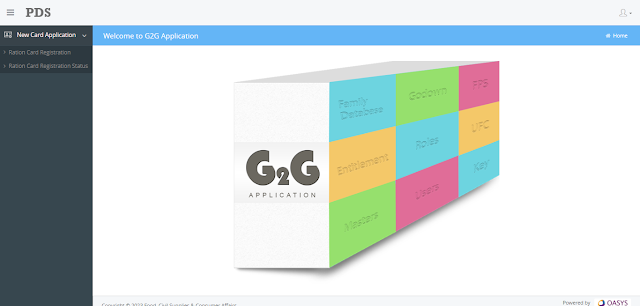
New Card Application यहां आपको 2 Options Show होंगे, 1. Ration Card Registration, 2. Ration Card Registration Status.
मैं आपको दोनों Options के बारे में बताउगां, पहले हम देखेंगें आप New Card Application Ration Card Registration कैसे कर सकते है, दुसरें मे आप Ration Card Registration Status कैसे Check कर सकते है
New Ration Card Registration Himachal Pradesh | New Ration Card Apply Online in HP?
New Ration Card Apply करने के लिए Ration Card Registration यहां Click करें, यहां आपको Personal Details, Family Member Details, Proof of Residence, Gas Connection, और Caste Details Add करनी होगी, चलीए देखते है आप कैसे Online Apply कर सकतै है
यहां आप Name of Family Head डालें, और Father’s / Husband’s / Wife’s Name यहां लिखें, और निचे Present Address, Address Line 1*, Address Line 2, Address Line 3 मे लिखें

Place and State from where migrated अगर आप दूसरे राज्य से Himachal Pradesh मे रहने आए है तो उस राज्य का नाम यहां लिखें जहां से आप आए है, अगर आपके पास कोई Deletion or Surrender certificate है तो यहां Yes पर Click करें और आप यहां Date और Reason of arrival in the distribution area डाल सकते है, और अगर Deletion or Surrender certificate नही है तो No ही रहने दै
और नीचे आप District Name, Block Name, Panchayat Name, FPS Code, FPS Name, PIN code, Email Address, Land Line Number इनमे जो जो Details Mandatory है यहां लिखें या Add करें

फिर आप Family Member Details यहां Click करें, आपको सबसे पहले Family Head की Details Add करनी है, Name of Family Head, Date of Birth, Gender, Relationship, Nationality, Profession, Annual Income, Mobile Number, Aadhaar Card Number, Is Differently Abled Person यह सभी Details Add करनी है
और निचे Bank Details Add करने का Option है आप चाहै तो Bank Details भी Add कर सकते है, सभी Mandatory (Required) Details Add करने के बाद निचे Add पर Click करें
इस तरह आप सभी Family Member Details Add करें, सभी Family Members जो आपने Add करने है आप बारी बारी Add करले, Family Members Add कर लेने के बाद सभी Family Members की Details आप निचे पढ सकते है, जैसे Name, Gender, Date of Birth, Relationship, Aadhaar Card Number, Action आदी

अब आपको नीचे Proof of Residence Add करना है और Document भी Upload करना है,
Proof of Residence Document Example And Size Note: (pdf, jpg, jpeg, png and gif only), (Max file size 2 mb)
| Proof of Residence Document Example | Proof of Residence Document Example |
|---|---|
| Aadhaar Card | Electricity Bill |
| Telephone Bill | Voter Identity Card |
| Gas Consumer card | Front page of Bank Pass Book |
| Passport | Tax Receipt (for house owners) |
| Rent Agreement (for tenants) | Slum Clearance Board Allotment Orders |
और Choose पर Click करके आप Documents Upload करें जो आपने Proof of Residence Select कीया था, अब आप चाहे तो नीचे अपनी Gas Connection की Details Add कर सकते है, अगर Gas Connection की Details Add करनी है आपने तो यहां Yes पर Click करें
और निचे Gas Connection की Details Add करें 2 Connections की Details आप Add कर सकतै है Connection #1, Connection #2, अब आप Registered Name for Connection, Oil Company, LPG Consumer Number, Gas Agency Name, No. of Cylinders की Details यहां Add कर सकते है,
और अगर Gas Connection की Details Add नही करनी है आपने तो यहां No पर Click करें
अव आप Caste Select करें आप जिसमे भी आते है जैसे Minority, SC ST, OBC, ST, SC, General, यहां Select करें
इसके बाद आपने अभी तक जो भी Details यहां Add की है उन सभी Details को एक बार ध्यान से Check करलें, और निचे Declaration पढ़ें और Tik करके Submit पर Click करें
Declaration: I do hereby solemnly affirm and state as per the Section 199 of IPC that: (a) the information given in this form is true (b) None of the persons mentioned above are in receipt of any ration form army/paramilitary forces and are also not entered in any consumer card in India & persons detailed above are actually residing on given address of applicant.

Application Submit करने के बाद आपको Application Number मिल जाएगा, इसके बाद आपको कुछ दिन तक इंतजार करना होगा, Application के Approve होने तक, Status कैसे Check करना है चलिए Nextstep मे देखते है, और आपको Application Number Save करके रखना है
New Ration Card Registration Status Check Online Himachal Pradesh?
Ration Card Application Status Check करने के लिए आपको DEPARTMENT OF FOOD, CIVIL SUPPLIES AND CONSUMER AFFAIRS इस Site मे दोवारा से आ जाना है, और New Card Application मे Ration Card Registration Status यहाँ Click करें
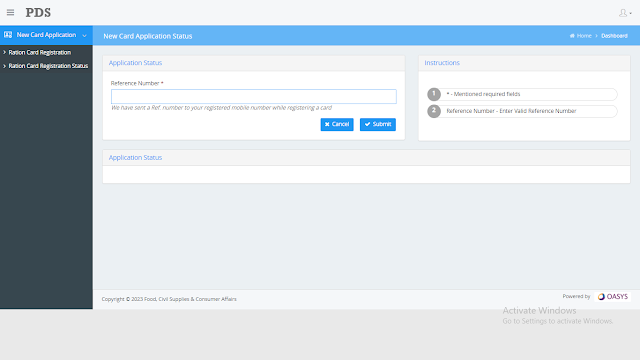
यहां Application Status मे Reference Number डाले आप, जो Apply करतै समय Generate हुआ था जव आपने Application Submit की थी, (We have sent a Ref. number to your registered mobile number while registering a card Cancel Submit)
Application No डालने के बाद Submit पर Click करें, Application Status आपको Show हो जाएगा आप देख सकते है, अगर Application में कुछ भी Remark आता है तो वो भी आप यहां पढ सकते है, और Correction करके Submit करदें
Ration Card Approval हो जाने के बाद Print कैसे निकाले Next Step मे पढें
Ration Card Download Online Himachal Pradesh?
सबसे पहले Google पर Epds HP Search करें, और Print Ration Card पहले Link पर Click करें, Print Ration Card यहां Select Input Type मे Aadhaar No या Ration Card No डालें और Search पर Click करें

आपको Ration Card Show हो जाएगा आप Ration Card का Print भी नीकाल सकते है या Download भी कर सकते है
Procedure for the online service by PDF https://g2g.hpepds.com/pdf-reports/RationCard-Checklist.pdf
- Visit the website https://g2g.hpepds.com/
- For Registration, user will do the mobile number and captcha validation at the home page of websitehttps://g2g.hpepds.com/after successful validation user will receive the OTP for
login validation.
- After Successful login user will navigate to citizen page in the main page, two options will be provided to the user in the page.
- Ration Card Registration
- Ration Card Registration status
- Click on Ration Card Registration and completely fill the form and upload the supporting documents and click on submit.
- On successful submission of the request, a unique reference number will be generated for reference purposes. The reference number will be forwarded to the user via SMS notifications.
- After the successful submission of the New Ration Card request, the application will be received by the Inspector/Panchayat Secretary for review and approval.
- Inspector/panchayat secretary will select the pending application and they will validate in the review screen and based on beneficiary eligibility inspector/ Panchayat Secretary will select the card type and approve the application.
- After the request has been approved, the new Ration Card number will be generated.
- SMS Notifications will be forwarded to the beneficiary for the updates of card status with New Ration Card number (if approved).
- If rejected, the SMS notification will be forwarded with the comments of rejection.
- User will visit the https://epds.co.in/RC_TEST.aspxto download the Ration card.
- On the website the user will input the details of “Select input type” and “Ration card no.” and hit search.
- After clicking on search user can see the his/her ration card and can print it
Timelines:
Timeline for service delivery is mandated under the HPPSG Act. https://food.hp.nic.in/pdfs/Notification_under_H.P._PSGA,2011.pdf
Thankyou.


